
Running responsible AI analysis on sensitive health data
Research teams use AIRA for biomarker reasoning across multi-omics cohorts, variant classification against ACMG criteria, polygenic risk scoring and agentic code development. The models behind that work run next to the data, and the data owner decides which models exist and where each of them may run.
Read The StoryBackground
Research data held under a data sharing agreement generally cannot be sent to a commercial model API. The agreement restricts where the data may be processed, and a prompt containing record level data or an error trace counts as processing in that sense. Most secure data environments have responded by blocking AI tools or permitting them only on synthetic or public data.
AIRA puts model inference behind a single service inside the DRE. The service authenticates each request, resolves it to an endpoint the administrator has approved, queues it against available compute and writes the request and response to the DRE audit log. Researchers call it with standard client libraries. They do not handle model credentials, and their code does not depend on where a particular model is hosted.
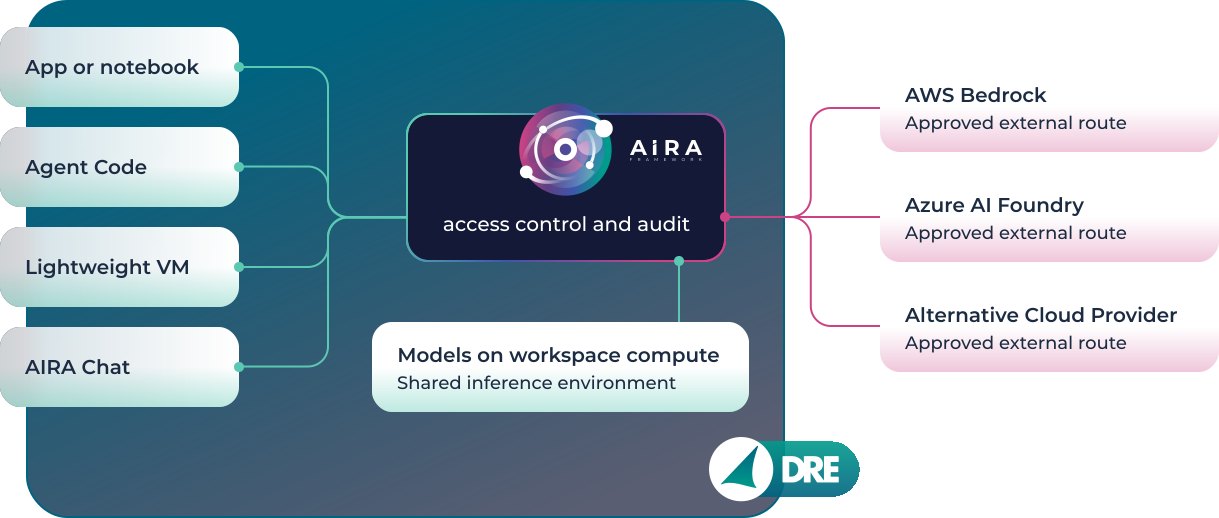
Request path from workspace tools to model endpoints. Each tool calls the same OpenAI compatible API and names a deployment, and AIRA maps that name to an endpoint on DRE compute, in Azure AI Foundry or in a Neo Cloud environment. Routes drawn dashed leave the DRE security boundary.
Model hosting and deployment names
A workspace is configured with a set of deployments. Each deployment has a name, which client code passes as the model parameter, and a target endpoint, which only the administrator sees. The example workspace below has five. Three target models in the DRE's shared inference environment, which runs on workspace infrastructure inside the customer's Azure subscription and has no internet egress. One targets a model in a secure inference environment on Neo Cloud, and the fifth targets a model enabled in the organisation's Azure AI Foundry account.
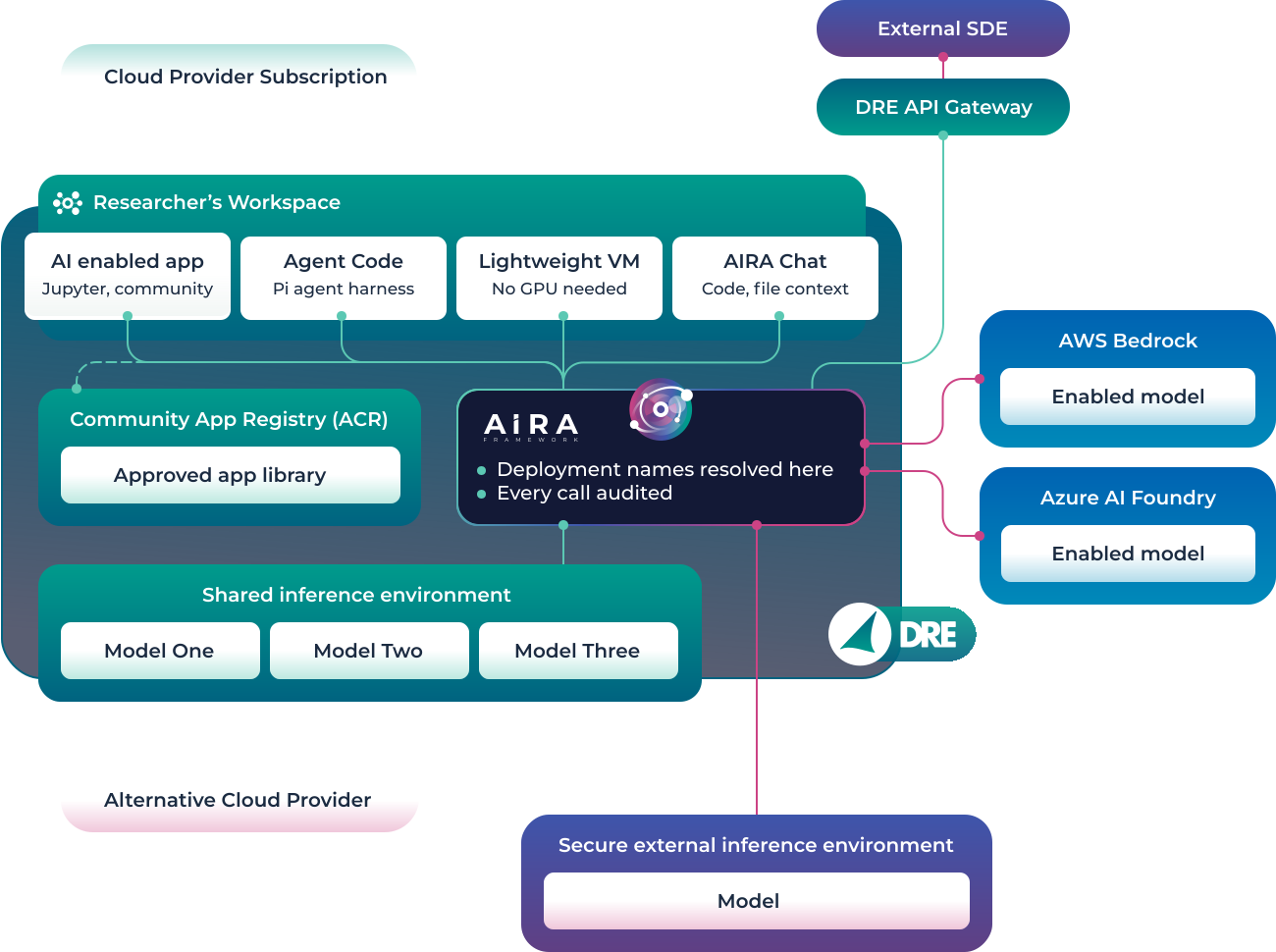
Deployment architecture for the example workspace. The shared inference environment is inside the DRE boundary. AI Foundry is inside the customer's Azure subscription but outside the DRE, and the Neo Cloud environment is outside both. Calls to all five deployments pass through AIRA and are written to the same audit record. External systems reach AIRA through the DRE API gateway, described under Access from outside the DRE.
Several deployments are useful because the steps in a research workflow make different demands on a model. Generating code against a known schema, or summarising the structure of an output file, needs little context and a small model does it well. Reasoning across a multi-omics dataset with literature context needs a larger model and a long context window. Using the largest available model for every step costs more than most of the work requires, and a small model on its own does poorly on the harder reasoning.
Client code sees only the deployment name. A script can send different steps to different models by changing that string, and the administrator can repoint a deployment, for instance from a Neo Cloud endpoint to a model newly hosted on DRE compute, without any change to the code that calls it.
Calling AIRA from R with ellmer and from Python with the openai package. The AIRA specific values are the base URL and the key. The platform injects WORKSPACE_API_KEY into the workspace environment, so researchers do not create or store keys. The model argument is a deployment name. Timeouts, asynchronous calls and JSON output are covered in the knowledge base guide to using the AIRA API from R and Python.
| Deployment name | Resolves to | Location |
|---|---|---|
workspace-chat |
Model 1, shared inference environment | Inside the DRE |
clinical-summariser |
Model 2, shared inference environment | Inside the DRE |
long-context-review |
Enabled model, Azure AI Foundry | Approved external |
genomics-specialist |
Model, Neo Cloud inference environment | Approved external |
Example deployment table for the workspace above, with illustrative names. Changing an entry in the second column is an administrative action and has no effect on code that calls the name in the first.
The deployment table also gives a data access committee something specific to approve. A request to use AI in a workspace becomes a request for named deployments with known hosting locations, and the committee's decision is recorded as configuration that can be inspected later.
Access from within a workspace
There are four places in a workspace from which researchers call AIRA. All of them use the same API and the same set of deployments.
Aridhia apps
JupyterLab, VSCode or any community app with AIRA support call the API directly. Community apps are container images that an administrator deploys from the organisation's Azure Container Registry, either to every workspace in a hub or to selected workspaces. They run next to the workspace data and have no outbound network access. An app author writes against the OpenAI compatible interface once, and the app then runs in any customer's DRE regardless of which models that customer has put behind the deployment names it uses.
Agent Coder app
Agent Code runs the Pi agent harness with AIRA as its model provider. Pi is a small open source terminal agent designed to be adapted to a workflow without modifying its internals. It supports per tool permissions and reads project instruction files at startup, and its sessions persist between uses. In the app the agent has access to the workspace file volume and database credentials, so it can read data, write and execute R or Python, read the output and revise its code. It is described in more detail below.
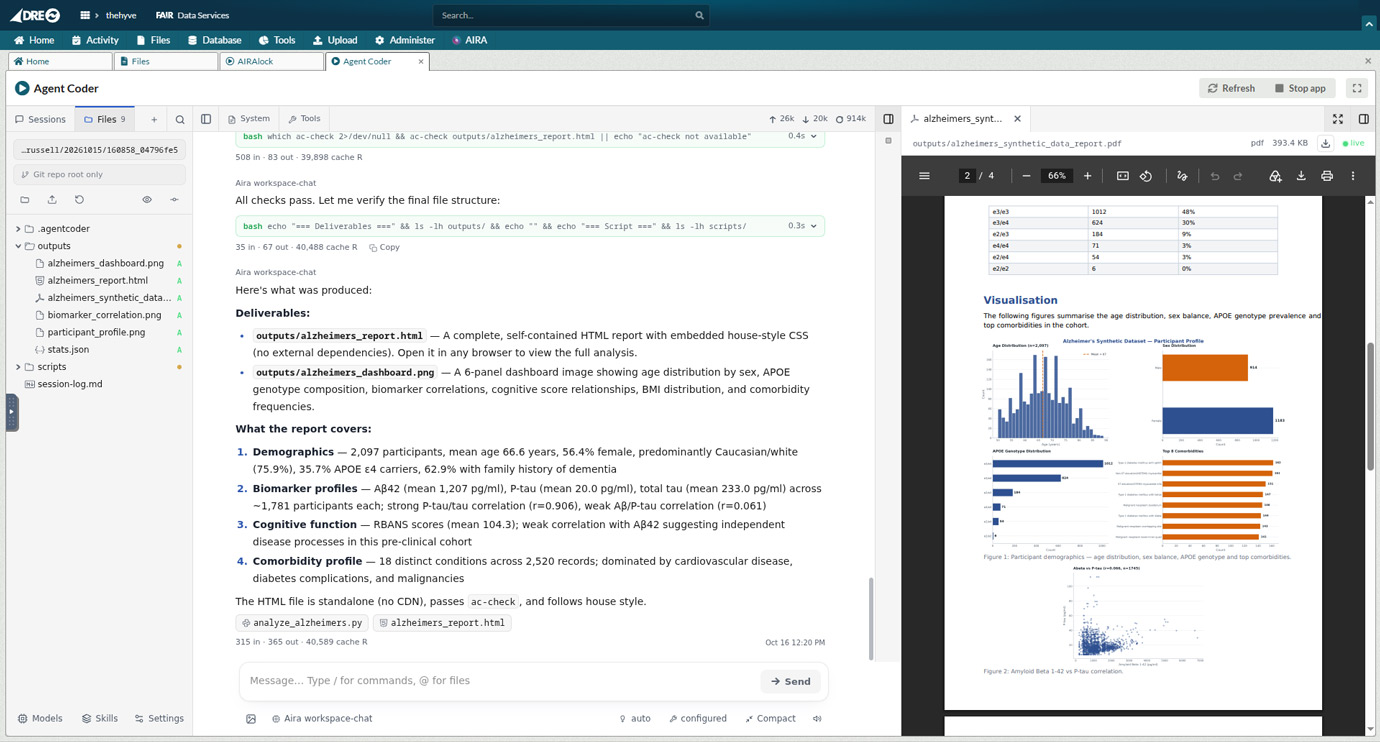
AIRA Chat
AIRA Chat is the interactive interface in the workspace, used mostly for code generation and for questions about files the researcher attaches. It uses the same deployments and audit logging as programmatic access. Some environments control API traffic carefully but leave browser based chat tools unmanaged, and running chat through AIRA avoids that gap.
Lightweight VM
Researchers can run their own code on a general purpose workspace VM, which needs no GPU, and call AIRA from it. Provisioning a GPU for each workspace is expensive, and GPU quota in most Azure regions can take weeks to obtain. Research use of inference also comes in bursts, so a dedicated GPU sits idle for much of its life.
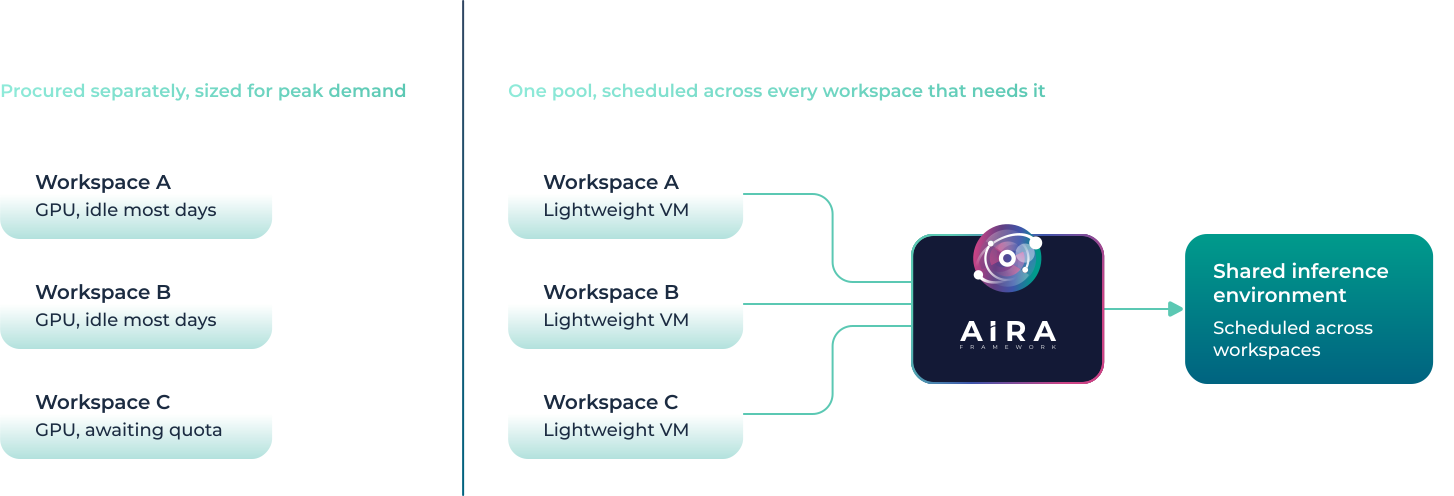
The above diagram shows two different setups. On the left, each workspace holds a GPU sized for its peak load and idle between sessions. To the right, workspaces run CPU only VMs and send inference to a shared pool that AIRA schedules across the hub. A new workspace can use existing deployments as soon as they are enabled for it, with no hardware to provision.
Long jobs, such as annotating or extracting fields from a large document set, can run as workspace background jobs that write results to the file volume.
Access from outside the DRE
External systems call AIRA through the DRE API gateway. Each system is issued a service credential and a set of deployment names, and its requests are authenticated and logged in the same way as requests from a workspace. An organisation can therefore run a single inference service for systems well beyond the research environment, with each system restricted to deployments suited to the data it handles.
The simplest case is a second secure data environment. An organisation operating both a national and a local TRE, or one that has taken on another SDE through a merger, can point both at the same deployments and maintain one set of model infrastructure. Federated analysis follows the same pattern, with a coordinating workspace sending tasks to remote nodes and each node calling the deployments it has been issued.
Many callers are not research platforms. A data catalogue can generate draft dataset descriptions and FAIR metadata for curators to review. A registry or electronic data capture system can suggest SNOMED CT and ICD-10 codes for free text fields, with a coder confirming each suggestion. An information governance team can produce first pass summaries of data sharing agreements, and a research office can check grant applications for missing sections before panel review. These teams rarely have GPU capacity of their own, and without a supported route to an approved model some of them will use consumer AI services, often without the organisation being aware of it.
The deployments issued to a system reflect the sensitivity of the data it processes. A system handling identifiable patient data is given deployments on DRE compute with no egress. Where a system works only with public or non personal metadata, it can be given deployments on the organisation's enterprise AI Foundry account, which offers larger models. The client code is identical in both cases.
| Calling system | What it asks for | Deployment issued | Runs |
|---|---|---|---|
| Second SDE | Inference for its own researchers | workspace-chat |
Offline, DRE compute |
| Registry or EDC | SNOMED and ICD-10 coding suggestions | clinical-coding |
Offline, DRE compute |
| Data catalogue | Draft descriptions and FAIR metadata | metadata-draft |
Enterprise account |
| IG workflow tool | First pass summaries of sharing agreements | long-context-review |
Enterprise account |
| Research office | Completeness checks on grant applications | metadata-draft |
Enterprise account |
Example allocation of deployments to external callers, with illustrative names. Moving a caller to a different tier, for instance returning the catalogue to DRE compute after a policy change, alters the last two columns only.
Brokering all of this through AIRA produces one audit record for every system that uses AI through it. From that record an administrator can report which systems hold credentials, which deployments each has called, request volume and cost per system, and the proportion of requests served outside the DRE boundary. AIRA has no control over what a calling system does with a response once it has been returned, and that remains the responsibility of the system owner.
Agentic development with Agent Code
AI coding tools used outside secure environments send file contents, schema details and error messages to a vendor API. In a secure environment this is normally prohibited, and researchers either go without or describe their data to an external tool from memory. Agent Code runs the agent inside the workspace and uses AIRA for model calls, so the context the agent works with stays within the boundary.
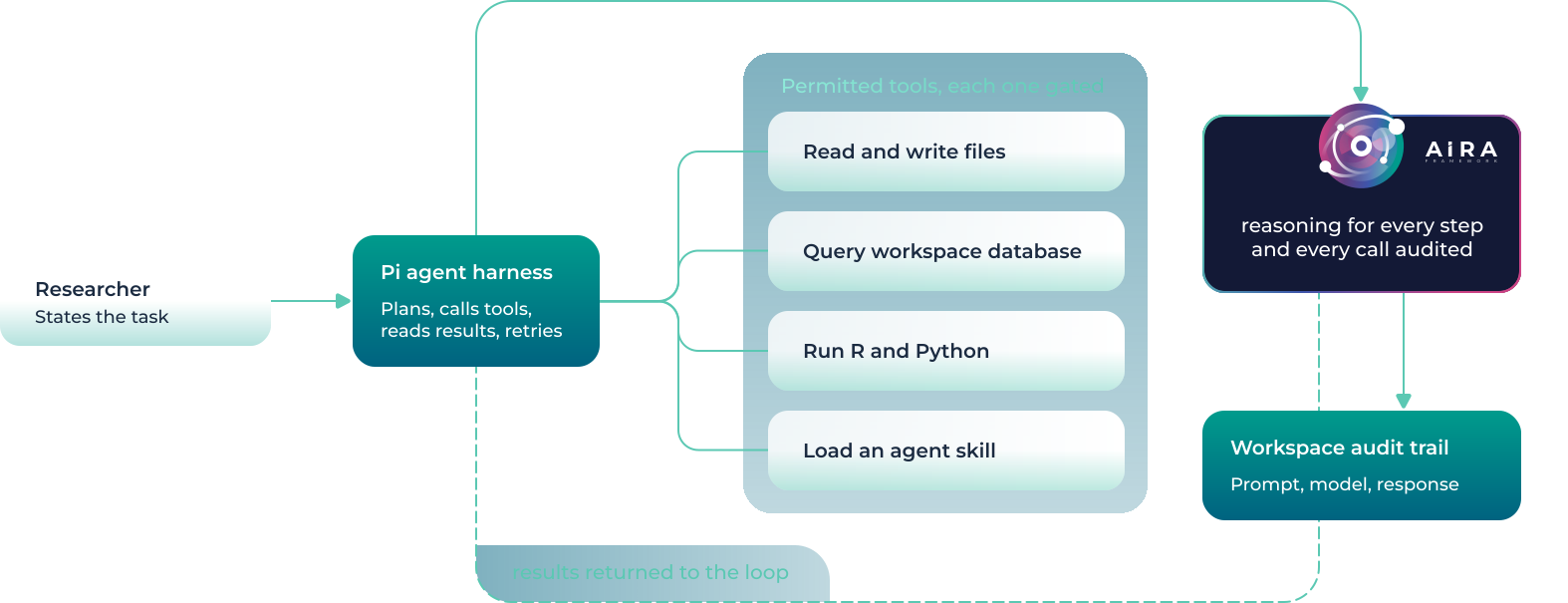
In the Agent Code loop the researcher sets a task, and Pi plans a step, calls a permitted tool, reads the result and plans the next step, with each planning call served by an AIRA deployment and logged. Tools are permissioned individually, so a workspace can allow file reads and code execution while withholding write access.
Direct access to data
A researcher using an external coding tool has to describe their data, since they cannot share it, and the tool writes code for the description. That code often runs on a toy example and then fails on the real table, because the date column is stored as text in about half the records and one site coded sex as 1 and 2 while another used M and F.
An agent in the workspace starts from the actual table. It can query column types and null counts, run a transformation and check the result. If a join drops eight thousand rows, the count appears in the tool output and the agent can investigate before it reports back.
Researchers also stop having to redact or synthesise examples before asking for help. Error output, which often contains data values, stays in the workspace with everything else the agent reads. For tables larger than any context window the agent issues aggregate queries and works from their results, so the full table never needs to be in context.
The tasks this suits are ones where the code has to run against real data before anyone knows whether it is correct. Examples are reshaping an extract into an analysis table and checking row counts across each join, porting an analysis between cohorts with different schemas, finding out why a pipeline that ran last month fails on new data, and regenerating figures and tables after a change to the cohort definition.
The agent can load the skill libraries used by ClawBio and the Bioinformatics Terminal, so a request to classify the variants in a VCF against ACMG criteria runs the procedure documented in the skill. The deployment Agent Code uses is configurable, so routine edits can go to a small model on DRE compute and harder reasoning to a larger approved deployment. Files the agent writes are ordinary workspace files and go through airlock review before export.
Workspace instruction files
Pi reads markdown instruction files, conventionally named AGENTS.md, at the start of a session. In a workspace these files hold what the agent cannot infer from its environment, such as where data is mounted, how to connect to the database, which deployment to use for which kind of work, and the team's coding conventions. They can also state data handling rules, including suppression thresholds and restrictions on what may be written to output directories.
An example workspace AGENTS.md. The data handling section restates the project's disclosure rules in a form the agent applies to each script it writes. The file is plain text in the workspace and can be reviewed and version controlled with the rest of the project.
Instruction files can be layered, so that a platform team ships a hub wide file with the app, a principal investigator adds a file for a particular cohort, and task files describe individual workflows step by step. Someone joining a project late then works with an agent that already follows the project's conventions and disclosure rules.
Community apps and agents that use AIRA
The apps and agents below run in the DRE and use AIRA for inference. The descriptions follow Aridhia's published material on each.
Ranking plasma biomarkers in an Alzheimer's cohort
Biomni is a biomedical reasoning agent developed at Stanford. In the published DRE example it works across a cohort's proteomic, longitudinal clinical and genetic risk data and ranks candidate plasma proteins against the evidence for cleared assays including p-tau217, GFAP and NfL.
Literature queries to PubMed go through controlled egress, and the cohort data stays in the workspace
Variant classification against ACMG criteria
Given a VCF, the skill applies a 28 criterion ACMG/AMP classification workflow, including pathogenicity scoring and screening against ACMG Secondary Findings v3.2. The criteria and the order in which they are applied are defined in the skill, so repeated runs follow the same procedure and produce a structured variant report.
Polygenic risk scores from the PGS Catalog
The PGS Catalog holds more than 3,000 published scores. This skill scores a cohort against a chosen score, handling variant matching between the cohort and the score file, and reports raw scores with percentiles against a reference population.
Output checking at egress
Files submitted for export are first classified by a deterministic rule engine. Its rules include NHS number detection with modulus 11 validation, and detection of suppression back calculation, where a totals row allows a suppressed cell to be recovered by subtraction.
For any file not classified green, AIRA adds an advisory reading of the file's structure. The reviewer makes the release decision and the model cannot alter a classification.
Dataset profiling
Cohort Profiler produces a statistical profile of a CSV covering missingness, outliers, distributions and correlations, and adds metadata already held in FAIR. With AIRA enabled a user can query the profile in natural language and keep the R code it generates for the analysis record.
Porting an analysis to a second cohort
Given an analysis that works on one cohort, the agent reads the second cohort's schema from the workspace database, rewrites the extraction and harmonisation code, runs it, and iterates on failures until row counts reconcile with the source. The resulting scripts remain in the workspace for reuse.
Command line bioinformatics
The terminal app provides a browser based Linux shell with bioinformatics and statistics tools installed and agent assistants configured to use AIRA. Bundled skills cover common sequence analysis and variant interpretation workflows.
Two further skill libraries have been tested in the DRE. K-Dense AI's Scientific Agent Skills has more than 130 skills in areas including molecular docking and virtual screening, structural biology, metabolomics, medical imaging and computational pathology. GPTomics bioSkills has more than 400 skills in 60 categories, among them sequencing workflows, CRISPR screen analysis, immunoinformatics, spatial transcriptomics for Visium, Xenium and Slide-seq data, and pathogen typing. All of these run as containers against the same AIRA endpoint and can be combined within one workspace.
Rule engine and model in AIRAlock
AIRAlock keeps its two components separate by design. The rule engine is deterministic and version controlled, so a given file always receives the same classification and the policy can be written down, but it has no way to interpret context. A GWAS summary statistics file, for example, triggers the high cardinality identifier rule on its rs_id column. The advisory model recognises from the column names that the file holds summary statistics and explains the flag to the reviewer, and the classification is left as the rule engine set it.
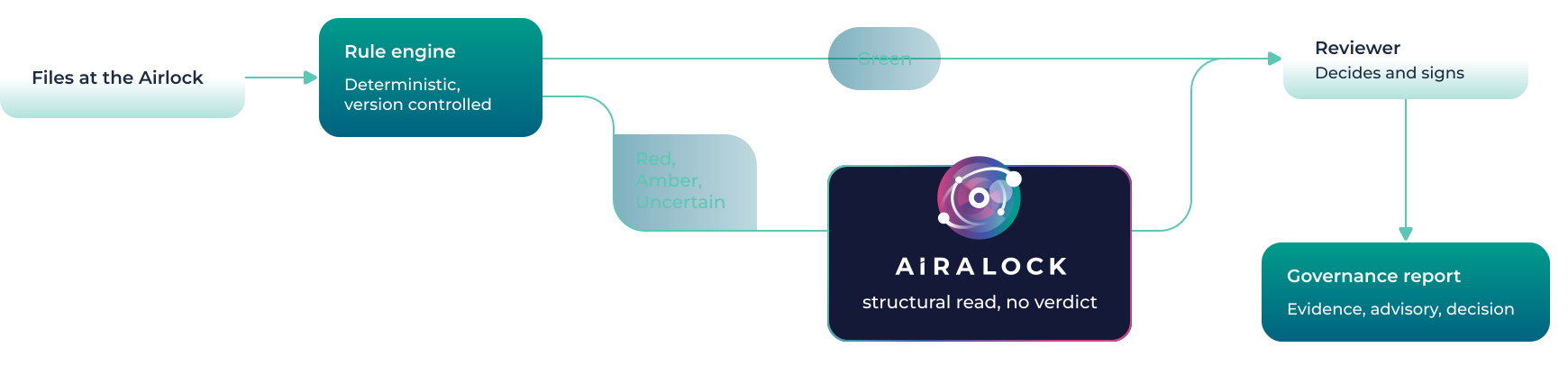
In the AIRAlock review flow, green files go straight to the reviewer. Red, amber and uncertain files also receive an AIRA advisory, which describes the file but assigns no classification. For each release the reviewer's decision, the rule findings and the advisory text are written to a governance report.
Controls available to the data owner
Decisions about AI use are made by the data custodian and applied by an administrator through the controls below.
Model availability
Deployments are enabled per workspace, and access to them is governed by the same role based access control that applies to data in the DRE.
Inference location
Deployments on DRE compute have no internet egress. Prompts, context and responses stay within the customer's Azure subscription and no telemetry leaves it.
External routes
A deployment targeting Neo Cloud or AI Foundry exists only if an administrator has created it, and it is listed in the workspace configuration with the internal ones.
Audit
Each inference request is written to the DRE audit system next to the existing record of data access.
Export
Files produced with AI assistance leave the workspace through the standard airlock review, which AIRAlock can support.
The DRE holds ISO 27001, ISO 27701, HITRUST and Cyber Essentials Plus certification, and AIRA runs within the same certified environment.
Other configurations
The configuration described here is one example. Some organisations run only offline models on DRE compute, in some cases a single small model used for code assistance, and create no external deployments. An organisation with its own domain model, trained on its own data, can host it in the shared inference environment and offer it to collaborating institutions through the API gateway. Each of these is a matter of deployment configuration and needs no change to the platform or to client code.
Talk to us about your model estate
We can walk through which models you would enable, which routes you would allow outside your own boundary, and what the audit position looks like for each.